A Hosted Cluster gives you a dedicated OpenShift Kubernetes cluster with its own control plane, running on Phoeniqs' Swiss sovereign infrastructure. You get full administrative access to your cluster while we manage the underlying control plane infrastructure.
What's included
- Dedicated OpenShift control plane, etcd, API server, and scheduler, isolated in its own namespace on the management cluster
- Worker nodes, sized to your requirements
- Cluster API, accessible via a stable hostname, with wildcard SSL/TLS certificates injected automatically during provisioning
- Storage, Ceph-backed storage classes (
ceph-rbdandcephfs), withceph-rbdset as the default storage class
Sizing and configuration
When ordering, you'll need to specify and provision the following as separate IaaS resources:
Number and size of worker nodes. Each worker requires 1 GB of memory overhead on top of your workload needs due to virtualization. Example: three 17 GB workers means 54 GB of total RAM provisioned.
Load Balancer Requires at least one purchased public ip address
Worker root volume: minimum 50 GB per worker
etcd storage: the control plane runs a highly available etcd with 3 members. The etcdSize value you configure applies per member, with a minimum of 10 GB each (30 GB total across all members)
Total minimum capacity pool storage = (3 × etcd size per member) + (number of workers × worker root volume size). Example: 3 workers at 50 GB + etcd at 10 GB per member = 150 GB (workers) + 30 GB (etcd) = 180 GB total
Pricing
See Resource Pricing for standard IaaS resource rates.
Licensing and lifecycle
New clusters deploy in approximately 10 minutes and start on a 60-day self-support trial license.
During the trial period, you can use the cluster fully, including for testing and evaluation.
To continue receiving support beyond 60 days, request activation before the trial expires by contacting support or opening a service ticket. Once activated, we deploy the cluster to production and it remains available indefinitely.
If activation is not requested before the trial ends, the cluster keeps running and you retain full access, but it falls outside the support agreement until activation is completed.
Getting started
Prerequisites
A Hosted Cluster can only be provisioned after its Capacity Pool and all required resources (compute, memory, and storage) are already purchased and provisioned in the portal. Only provisioned Capacity Pools appear in the Hosted Cluster form.
See Sizing and configuration for minimum worker, etcd, and storage requirements before ordering resources.
Provision the cluster
In the Phoeniqs portal, open your Resource Group and start a Hosted Cluster subscription. Complete the form with your cluster settings and assign users, admins, and groups as needed:
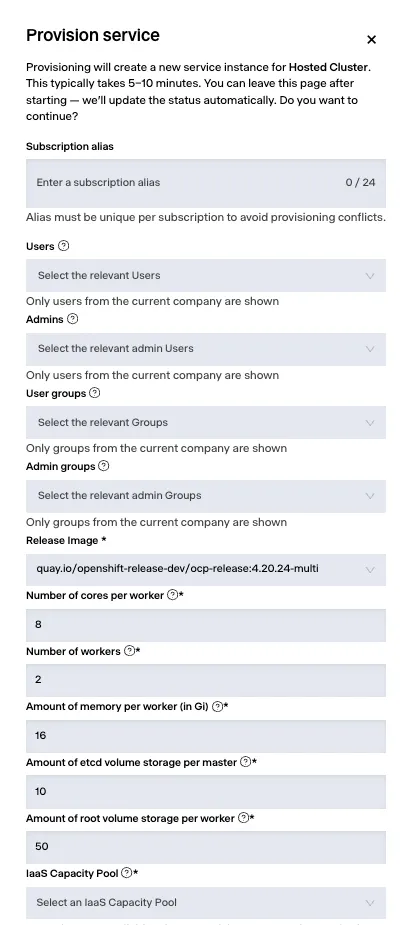
Click Provision to start deployment.
After provisioning
Hosted clusters take approximately 10 minutes to provision. When the cluster is ready, the Configuration tab in the portal shows your credentials and the Launch OpenShift Console link (see below).
Once provisioning completes, download or view your Kubernetes admin configuration, copy the admin password, and use Launch OpenShift Console to open the cluster. Wildcard certificates are injected automatically, no manual TLS configuration is required.
Your apps domain is ready to use for routing — see Exposing applications below. The wildcard DNS record for the whole apps domain is not yet automated and must be requested by opening a service ticket; DNS automation is in progress.
Log in via the OpenShift console or CLI (oc/kubectl) to begin deploying workloads.
For login and first steps, see Access Your OpenShift.
Exposing applications
Each Hosted Cluster has its own apps domain, *.apps.<cluster-name>.basel.phoeniqs.com. The default router of your cluster already serves a wildcard certificate for this domain, so no TLS configuration is needed on your side.
All Hosted Clusters are reached through a shared platform ingress at 185.250.226.194. It forwards TLS traffic to the router of your cluster based on the hostname (SNI), without terminating it.
Using the apps domain
To expose an application, create a Route or Ingress with a hostname under your apps domain, for example myapp.apps.<cluster-name>.basel.phoeniqs.com. No change on our side is needed for the routing.
The console and OAuth hostnames resolve automatically. The wildcard DNS record for the rest of the apps domain is not yet automated — request it by opening a service ticket.
Using a custom domain
A hostname outside your apps domain does not reach your cluster by default. The shared ingress answers it itself, with a *.basel.phoeniqs.com certificate and a 503 Application not available page.
To use a custom domain, open a service ticket with the exact hostnames. Once we have added them to the shared ingress:
- point the DNS records of these hostnames to
185.250.226.194; - create the Route or Ingress for them in your cluster;
- serve the certificate for your domain from inside your cluster. TLS is passed through, so the shared ingress does not hold or renew your certificate.
Preparing your workloads for worker node replacement
Worker nodes are replaced one at a time when the platform or OpenShift is updated, when the worker size changes, or when a node is repaired. A new worker is added, then an old one is drained and deleted. New workers always get new names. We notify you when a maintenance starts, not for each node.
OpenShift version upgrades and our internal HyperShift updates each trigger this rolling replacement of the hosted cluster's worker nodes.
What to avoid
- Pinning to node names. Do not use
kubernetes.io/hostnamein anodeSelectoror node affinity, and do not setspec.nodeName. A pinned pod cannot restart elsewhere, staysPending, and blocks the drain. - Acting on nodes during a maintenance. Do not cordon, drain, or delete nodes yourself.
- Restrictive PodDisruptionBudgets. Every PDB must allow at least one disruption.
minAvailableequal to the replica count, ormaxUnavailable: 0, blocks the drain indefinitely. - Data on the node.
hostPath,emptyDir, andlocalvolumes are deleted with the node. Use PersistentVolumeClaims.
Node labels, taints and cordons are not kept
Labels, taints, and cordons you set on nodes exist only on the Node object and are lost when the node is replaced. Reapply them to the new workers as soon as they join, ideally automatically from inside your cluster.
Recommended
- Run critical workloads with at least 2 replicas spread across nodes, using anti-affinity or topology spread constraints. Clustered applications must keep quorum when one member restarts.
- Keep
terminationGracePeriodSecondsandpreStophooks short.