Settings → General holds your display preferences, restarting the box, the updates waiting for it, the backup and restore of your workspace, and the status of the agent server.
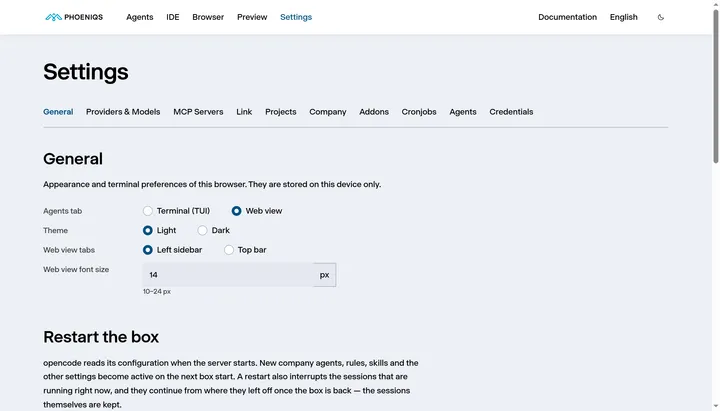
Appearance
All of these are stored in your browser only. They do not follow you to another device or browser, and they are not part of an export.
Restart the box
Restart the box restarts the workspace at once. Most configuration changes
reach a running workspace by themselves, so this is mainly for the parts that
cannot reload live — the image the workspace runs and your personal env.sh —
or simply to force a clean start without waiting for the next platform update.
The box is unreachable for about a minute, this page reloads by itself, and the sessions running at that moment end while the sessions themselves are kept.
Updates
A change to the box — a new platform version, a changed setting — is applied from the platform's configuration right away, but the short restart it needs is deferred: the box keeps running what it is on, so a change never interrupts you in the middle of a session. The Updates panel shows what is waiting and when it will be applied.
While an update is waiting you also see a banner at the top of the workspace, with the same choice.
Applying an update restarts the box: it is unreachable for about a minute, this
page comes back by itself, and the sessions that are running at that moment end.
The sessions themselves are kept, so you can reopen them from the
Agents tab. Nothing under /workspace is affected —
see Workspace data and restarts.
If nothing is waiting, the panel says the box is up to date.
Workspace data
Back up your workspace as a .zip archive, or restore one.
Importing an archive
- Click Choose archive… and select an archive exported from a workspace.
- Read the confirmation, then click Import.
Every top-level folder in the archive replaces the folder of the same name in your workspace. Folders the archive does not contain are left as they are. An import cannot be undone, so use Export all first if you might want to go back.
When it finishes, the import reports how many folders it replaced and how many it created. If it replaced your settings, reload the Agents tab so it picks up the new settings.
Archives can be up to 3.5 GiB.
For what a workspace keeps across restarts in the first place, see Workspace data and restarts.
Server
The Server panel shows the agent server your workspace runs on:
- State, Healthy when the server answers as expected
- Version, the version of the agent server
- API base and Directory in scope, which the IDE and the Preview use to reach it
Quote the version when you contact support. If the state shows Not healthy, or the panel reports that the server did not answer, include that as well.