Settings → Credentials holds every login and secret the workspace uses, in five sections. Everything here is stored encrypted on the workspace volume and restored each time the workspace starts. Secrets are shown masked once saved.
Repository credentials
The logins your checkouts use, one per Git or SVN host. A company administrator sets the company-settings repository's own key in the console's Company administration area — that key clones the company settings, not your projects.
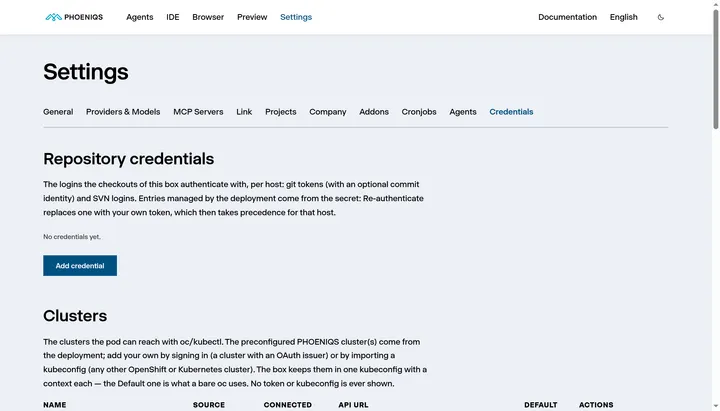
Click Add credential and choose the type:
- Git: the Host, a Token (a personal access token with read and write access to repositories), and optionally your User name, which can otherwise be read from the token. Add the Commit name and Email your commits should carry; they are prefilled from your sign-in.
- SVN: a user name and password for an SVN host.
Mark one Git credential as Default to make it your default commit identity. The workspace and the agent use the credential that matches a repository's host, so commits and pushes carry your identity.
Some entries may come with the deployment. Re-authenticate replaces one with your own token, which from then on takes precedence for that host.
Provider API keys
The keys the agent uses to reach model providers.
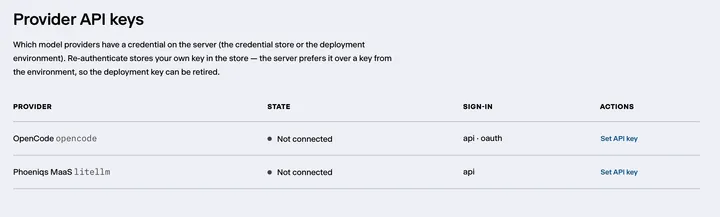
- Phoeniqs MaaS, the PHOENIQS AI Model Service, is set up with the key created when the workspace was provisioned. Set your own key only to use a different Base LLM API key; the workspace then prefers yours.
- OpenCode is OpenCode's own hosted model service. Setting a key for it sends your prompts and code to OpenCode, outside PHOENIQS.
Keys for providers you added under Providers & Models are managed here too.
Clusters (OpenShift / Kubernetes)
The workspace can hold credentials for several OpenShift or Kubernetes
clusters, so that oc/kubectl commands — yours and the agent's — run
against the cluster you are working on, as you. PHOENIQS clusters come
preconfigured by the environment: Basel (the default) and ai-3.
A company can publish its own PHOENIQS clusters through company settings
(see below), which carry a Company badge. A cluster you add yourself is
your own entry and is shown with a User badge.
The list has a Connected column (a green dot when the workspace holds a credential for that cluster / you are signed in) and a per-row Details action that shows the cluster's user, token validity, connection type, source and endpoints. Each row's badge tells you who added it — Deployment (the environment), Company (your company), User or SSO — and this does not change when you sign in: logging in to a cluster simply turns its Connected dot green.
Without a personal cluster credential, oc/kubectl run under the
workspace's own technical (service) account.
- A cluster with PHOENIQS single sign-on — the preconfigured PHOENIQS clusters — is connected with Connect via SSO, which signs you in with your PHOENIQS account. (Only Basel has the PHOENIQS identity provider wired today; the other PHOENIQS clusters are reached by importing a kubeconfig until it lands.)
- Add your own cluster (a Kubernetes or OpenShift cluster, including a non-Phoeniqs one): click Add and import a kubeconfig (paste it or choose the file). The workspace merges it into the combined kubeconfig it manages, so your cluster appears next to the preconfigured ones.
Many companies publish extra clusters (including internal PHOENIQS clusters
such as ai-2 and dev-01) through company settings — the reference
file, with a commented-out example, lives in the company-settings template
phoenix-oss/ai-build-config-tpl
(.opencode/references/clusters.yaml). Company catalog examples are always added
there, not inline in the docs.
Switch which cluster oc/kubectl target by choosing the Default on the
row you want. Entries that come with the deployment or the company are
preconfigured and cannot be edited directly; Re-authenticate or
Import kubeconfig creates your own entry, which then takes precedence for
that cluster.
Personal environment
Environment variables for the tools you and the agent run in terminals, such as a token for an extra command-line tool.
- Names use upper-case letters, digits and underscores, starting with a letter, such as
MY_TOOL_TOKEN. Names the platform uses itself are reserved. - Values are a single line and stored encrypted.
- New terminals get a variable immediately. The agent server picks it up the next time the workspace starts.
- A value set here overrides the deployment's value of the same name.
Keys for MCP servers and model providers belong in their own sections, not
here. For SVN, you can set SVN_USERNAME and SVN_PASSWORD here instead of an
SVN credential.
MCP authorizations
How each tool on the MCP Servers sub-tab signs in, with the same Authenticate, Re-authenticate and Remove auth actions. Each entry shows which identity the tool acts as.
- Tools that use a Git login, such as
forgejo, use your stored Git credential for their host by default. Choose Use a dedicated token instead to give the tool a separate token, and Use a stored git credential to go back. - A tool that comes with the deployment can be switched to your own key or values with Re-authenticate. It is then re-created under the same name in your own settings, and connects at once.
Values you enter are saved in your own settings and never shown again.