
#
How to cancel a Model Service Subscription
You can cancel your Model Service subscription at any time directly from the Phoeniqs Console. Cancellation takes effect immediately and any outstanding usage is included in your next invoice cycle.
#
Cancel a Subscription
#
1. Log in to the Phoeniqs Console
Sign in to your account at https://console.phoeniqs.com.
#
2. Open the Subscriptions page
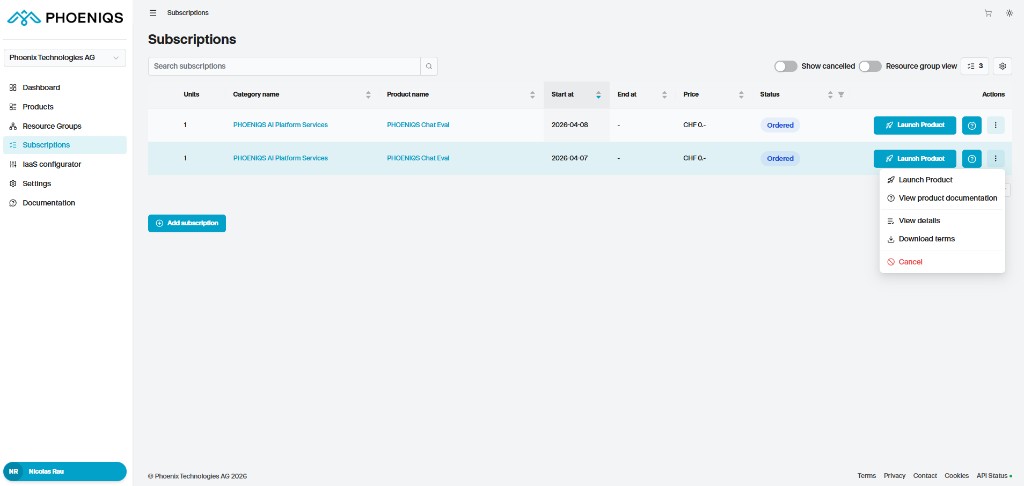
Navigate to Subscriptions using the left-hand menu.
#
3. Locate the subscription
Find the subscription you want to cancel in the list.
#
4. Open the subscription menu
Click the three-dot menu on the right side of the subscription row.
#
5. Select Cancel
Choose Cancel from the menu to confirm the cancellation.
#
What happens next
- Your subscription is canceled immediately.
- Any open usage or outstanding charges will be included in your next invoice cycle.
#
Notes
Good to know
- Cancellation is effective immediately. No further usage will be billed beyond that point.
- You will still receive a final invoice for any remaining charges.
- You can see your cancelled subscriptions by toggling the Show cancelled control on the Subscriptions page.
tip Need help?
If you experience any issues or need assistance, please contact support.
#
See also