
#
Refresh Response
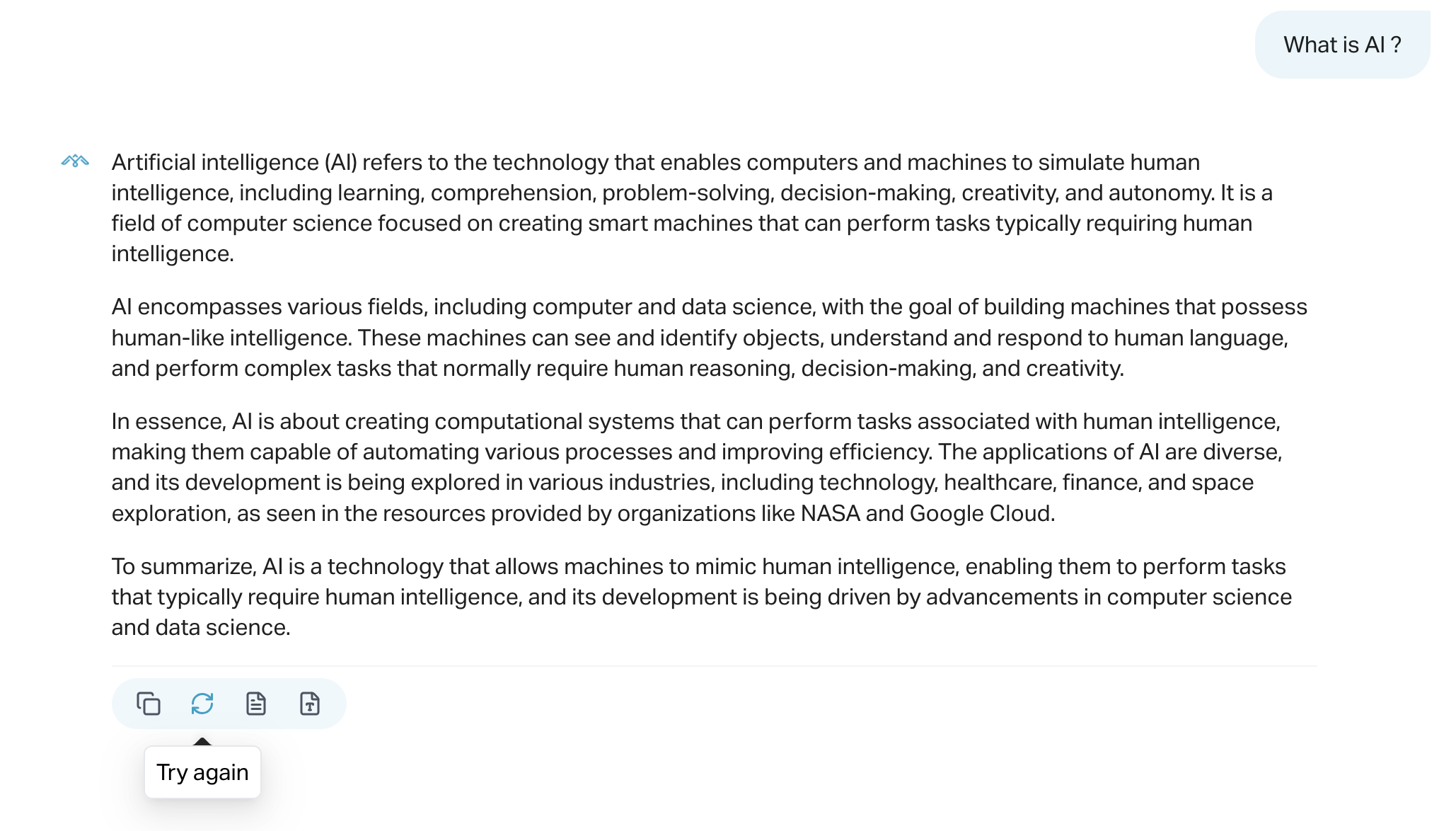
The Refresh Response feature allows users to re-generate a specific chatbot message when the original answer was incomplete, incorrect, or failed to load. This is done by clicking a refresh icon that appears below eligible bot responses.
#
What It Does
- Re-sends the original question to the backend
- Removes the message that failed or needs replacement
- Shows visual feedback: loading spinner or failure icon
- Does not affect other messages in the chat
#
How to Use
Hover over the agent’s response you want to refresh.
Click the Try again icon below the message.
A new answer will be generated using the same input.
If the refresh fails, an error icon will appear and an error toast will notify you.
#
Visual Feedback
- Default: Circular arrow icon
- Loading: Spinner icon appears while awaiting response
- Failed: Cross icon appears if refresh fails
#
Important Notes
- Only works for messages generated by the assistant
- The original message is removed and replaced with a new one
- The session context remains intact
- If the question field is empty, the refresh will not run and an error will be shown
#
Troubleshooting
If refreshing fails:
- Make sure the original question exists (not null/undefined)
- Check your internet connection
- Try again—some errors may be temporary
This tool is especially useful during debugging or when an assistant reply doesn’t meet expectations and a quick retry is desired.